
Your AI Coworker Just Started Without You
Part 1 of the Chief of Staff Series
TECHNOLOGYAI NEWS
4/25/202611 min read
Your AI Coworker Just Started Without You
OpenAI promoted ChatGPT from helpful intern to autonomous teammate. The persona is free. The system is where you'll quietly fail.
The Meeting You Weren't In
It's Tuesday at 11 PM.
Somewhere, an AI agent is drafting a follow-up to a sales prospect. It's pulling context from a Salesforce record. It's reading a Gong call transcript. It's dropping the email straight into a rep's inbox and logging the action in the CRM.
Nobody asked it to.
The rep is asleep.
This is not a demo. This is what OpenAI's Workspace Agents do, and as of April 22, 2026, they are live inside ChatGPT for any team on a Business, Enterprise, Edu, or Teachers plan.
OpenAI calls them "an evolution of GPTs."
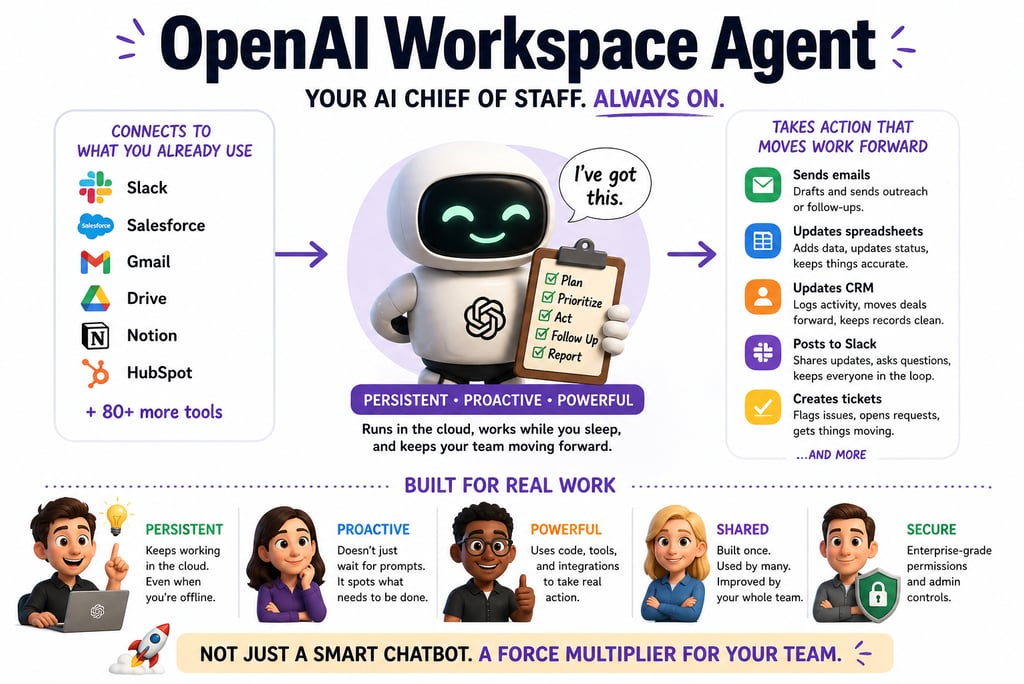
Translation: They quietly retired the Custom GPT era for organizations and replaced it with something that runs in the cloud, integrates with about 90 enterprise tools, and keeps executing tasks while you're on a beach in Portugal.
That sounds like an AI Chief of Staff because OpenAI is explicitly positioning it that way.
The question worth answering is not whether the model works. The model works. The question is what it actually takes to build one of these things into something that functions like a real Chief of Staff, rather than a well-dressed note-taker with confident grammar.
What Just Changed (And Why the Press Release Is Underselling It)
Quick context for anyone who skipped the 2023 hype cycle.
Custom GPTs, introduced in late 2023, were configured chatbots. You gave them a persona, a few instructions, maybe some files. They responded to prompts. Useful. Limited. Reactive.
Workspace Agents are a different animal.
Three structural shifts:
They're persistent. They run in the cloud. They keep working after you close your laptop. You can schedule them, trigger them from Slack, or set them loose on a recurring workflow.
They're shared. Custom GPTs were personal. Workspace Agents are organizational. One team builds an agent. The whole company can use it, improve it, and build on top of it.
They take real actions. Powered by Codex (OpenAI's cloud coding agent), they write and run code, update CRM records, send messages, file tickets, and edit spreadsheets. All inside a permissions framework set by admins.
That last one is the part that matters.
A Custom GPT could describe what should happen. A Workspace Agent does the thing.
Rippling's AI engineering team, quoted in OpenAI's launch materials, put it bluntly: the hard part of building an agent is not the model. It's the integrations, the memory, the user experience. Workspace Agents collapsed that work.
A Sales Consultant at Rippling (not an engineer, not a platform team, a sales person) built, evaluated, and iterated a complete Sales Opportunity agent end-to-end. Work that previously consumed 5-6 hours a week per rep now runs automatically in the background of every deal.
That's the pitch.
Now let's talk about everything between you and that outcome.
What a Real Chief of Staff Actually Does
Before you "configure your first agent" with a clever system prompt, get clear-eyed about what you're trying to replicate.
A real Chief of Staff doesn't just answer questions.
They hold context across weeks and months. They push back on bad decisions. They surface what's slipping before the principal notices. They manage the gap between what a leader says they want and what actually gets done.
They are a system enforcer, a pattern recognizer, a tiebreaker.
The most common failure mode people encounter with AI agents is confusing the persona of the system.
You spend 20 minutes writing an elaborate system prompt:
"You are an experienced Chief of Staff who prioritizes ruthlessly and has a direct communication style."
The agent responds brilliantly. It sounds right. It feels like a CoS.
Then you come back tomorrow.
It has no memory of what you discussed. It can't tell you what slipped last week. It doesn't know your Q2 priorities changed because of a board conversation it wasn't in.
Reality check: If your AI isn't tracking commitments, enforcing follow-ups, and creating clarity from chaos, it is not a Chief of Staff.
It's a note-taker with a confident tone.
The gap between those two things is architectural.
That's where most people stop.
Persona vs. System (Or: Why Your Demo Looks Better Than Your Production)
Here's the fundamental problem.
Most people optimize for the layer that's most visible and most immediately impressive. That's the wrong layer.
What you get out of the box:
Fluent, smart-sounding responses
Session context (which evaporates)
Following instructions in the moment
Guesses at priorities
Outputs when asked
No feedback loop
What you actually need:
Consistent, accountable behavior
Persistent state across days and weeks
Status tracking and overdue surfacing
Clear escalation rules
Triggered actions without being prompted
A loop that learns what's working
Notice the asymmetry?
OpenAI gives you the persona layer almost automatically. The model is excellent. The conversational quality is high. The tool integrations are real and growing.
The system (the part that makes it behave like a reliable organizational asset rather than an impressive chatbot) is on you.
This is not a criticism of OpenAI. It's the correct division of responsibility. The platform gives you the primitives. Turning those primitives into institutional infrastructure is design work, not configuration work.
Translation: You did not buy a Chief of Staff. You bought the modeling clay. The Chief of Staff is something you sculpt.
Most people will skip the sculpting.
That's where the next 18 months of horror stories come from.
The Five Things Nobody Builds
This is the section that separates a working agent from an expensive demo.
Each layer requires deliberate design. Each one is where teams cut corners.
1. Memory Layer
Large language models are stateless by default.
Every API call starts fresh. Workspace Agents have session memory and "improve over time" (OpenAI's words). For anything that spans weeks or requires organizational context, you'll need external memory: a vector database, a Notion workspace, or a structured document the agent reads and writes.
Your agent needs a filing cabinet, not just a sticky note from this morning's meeting.
2. Task System
An agent that generates a to-do list is not an agent that tracks whether the list gets done.
You need a defined task structure: format, status fields, priority levels, and a mechanism for the agent to reference and update that structure at every interaction.
Without it, priorities exist only in the current prompt.
They evaporate the moment you start a new conversation.
That's not a Chief of Staff. That's an Etch-A-Sketch.
3. Decision Rules
The most common failure in AI agent deployments is agents that don't know what they don't know.
They confidently proceed on tasks that should have been escalated. They defer on things they could have handled. You need explicit rules for what requires human approval, what proceeds automatically, and what gets flagged but not blocked.
The good news: Workspace Agents support approval flows natively. They can ask for permission before sending an email or editing a spreadsheet.
The less-good news: the logic governing when those approvals trigger? Yours to define.
If you don't define it, the default is "the agent decides." Sleep well.
4. Execution Layer
This is what actually separates Workspace Agents from Custom GPTs.
They can do things. Run code. Update CRM records. Send Slack messages. File tickets. The execution layer is where the agent stops being a writing assistant and starts being a workflow participant.
Mapping it correctly (which systems, which data, which actions, which authorization) is critical for both functionality and security.
Connecting everything because it's faster is how you wake up to a 3 AM Slack from your CISO.
5. Operating Rhythm
The piece most teams forget entirely.
An agent without a rhythm is an agent you have to remember to engage. A CoS without a cadence isn't a CoS. It's on-call support you constantly have to page.
Build a rhythm from day one:
Daily: morning briefing trigger, midday reprioritization, end-of-day review of what slipped
Weekly: planning session, priority reset, status sweep
These aren't fancy features. They're prompts on a schedule. They're also the difference between "tool I use sometimes" and "operational partner I depend on."
That difference is your entire ROI.
Where It Shines. Where It Snaps.
OpenAI's Workspace Agents are excellent in specific conditions.
Knowing the envelope means designing around the edges instead of getting blindsided by them.
Where they're strong:
Fast deployment. Going from the described workflow to a working agent is genuinely quick, especially with templates.
Tool integration. Native connections to Slack, Google Drive, Salesforce, Notion, Atlassian, and others actually work. The list keeps growing.
Execution tasks. Drafting, coding, pulling data, generating reports, and filing tickets. Strong performance.
Team scalability. One well-built agent can serve a whole organization. The Agents tab becomes a shared resource library.
Where they break:
Long-horizon memory. Without external persistence, context degrades across sessions.
Independent prioritization. Agents follow the rules you set. They don't autonomously decide what matters.
Deep reasoning chains. For complex multi-step analysis, the model often produces fluent but shallow conclusions.
Ambiguous context. When information is scattered, incomplete, or contradictory, agents will sound right while being factually wrong.
That last failure mode is the one that should scare you.
Goldman Sachs analysts noted in early 2026 that AI engineering teams' focus was shifting from building larger models to building better memory. The model quality ceiling is high. The memory architecture floor is where most deployments collapse.
You will not lose to a competitor with a smarter model.
You will lose to a competitor with better scaffolding around a similar one.
Setting One Up Without Setting Yourself On Fire
Skip the step-by-step (OpenAI Academy has tutorials). Here's how to think through the build.
Phase 1: Define the Job, Not the Persona
Don't start with "act as a Chief of Staff." That's the persona trap.
Start with the actual workflow. Lead qualification? Weekly metrics reporting? Software request triage? OpenAI's own examples (lead outreach, product feedback routing, third-party risk management) all describe specific, bounded workflows.
The more concrete the job, the better the agent.
Vague inputs produce vague outputs. Shocking, I know.
Phase 2: Map Tools Before You Connect Them
Which systems does this workflow touch?
What data does the agent need to read? What actions does it need to take?
This is where most teams get sloppy. They connect everything and set permissive access controls because it's faster.
Faster is also how breaches happen.
Map the minimum viable toolset first. Expand later, with intent.
Phase 3: Build Structure, Not Just Prompts
Create the external scaffolding before you write a single instruction.
Task format. Status tracking. Priority definitions. Escalation criteria.
This doesn't have to be complex. A well-structured Notion document or a small database that the agent references is more than enough for most use cases. The point is to give the agent a consistent reference point that persists across sessions.
A prompt is not a system. A prompt is just a really polite email.
Phase 4: Set Your Operating Rhythm
Schedule the agent's recurring interactions.
Morning briefing. Daily task review. End-of-week summary. Workspace Agents support scheduling natively.
Make these automatic. If you have to remember to trigger your agent, your agent has already failed.
Phase 5: Define Governance Before Your Agent Touches Anything Sensitive
Not optional.
Decide which actions require human approval. Decide who can build and publish agents. Decide what data sources are in scope. Decide what logging you need.
OpenAI's enterprise controls let admins set role-based permissions. The Compliance API gives visibility into every agent's configuration, updates, and runs.
Read that sentence again before you give your agent access to your CRM.
Now read it a third time before you give it access to payroll.
When to Reach for Claude or OpenClaw
Workspace Agents are excellent fast-start operators. They are not the only tool in the stack, and treating them like one is how you build a hammer-shaped solution to a screw-shaped problem.
Reach for Claude when the thinking gets complex.
Genuinely multi-step reasoning. Strategy synthesis. Nuanced document analysis. Decisions that require weighing competing considerations rather than just executing them.
Claude's extended thinking and larger context handling produce more deliberate output. OpenAI for execution velocity. Claude for depth of reasoning.
Reach for OpenClaw when the automation gets repetitive at scale.
Once you've designed a workflow and proved it works, OpenClaw's architecture is built for autonomous, repeatable execution at high volume without continuous oversight.
It's the difference between a Chief of Staff who designs the system and an operations team that runs it.
The actually powerful setup: OpenAI Workspace Agent as a fast-moving executor, Claude as a thinking partner for complex decisions, and OpenClaw running the proven, repetitive infrastructure.
Different tools. Complementary roles. Stop trying to make one model do everything.
What This Actually Signals
OpenAI's Workspace Agents aren't a product update.
They're a flag planted on the ground, pointing to where enterprise software is going next.
The Custom GPT era was about individual productivity. Workspace Agents are about organizational coordination. The handoffs. The shared context. The processes that happen between people and across teams.
OpenAI is deliberately targeting the layer of work that has always been the most expensive and the most broken: the space between systems where information falls through the cracks, and nothing moves unless someone remembers to push it.
If the architecture works as advertised, this isn't a modest productivity boost.
It's a restructuring of what coordination overhead looks like inside organizations. Teams currently burning 30% of their time managing processes, chasing status updates, and reformatting information for different stakeholders could see that work absorbed by the agent layer.
This is not theoretical.
OpenAI's own accounting team is already using an agent to handle parts of the month-end close. Journal entries. Balance sheet reconciliations. Variance analysis. Workpapers with underlying inputs and control totals, generated in minutes instead of hours.
So the question isn't "does this work?"
The question is who designs those conditions thoughtfully versus who ships a misconfigured agent with admin access and calls it a productivity win.
You know which group is bigger. So do I.
The Bill Coming Due
Every shiny new platform comes with a fine-print invoice.
Here's what's underlined and bolded on this one.
Risks
Governance debt accumulates fast. AI-related access misconfigurations have tripled in enterprise deployments since 2024 (from 12% to 39%). 41% of enterprises admit their Zero Trust frameworks don't yet include AI-specific identity classification. Your agents are inheriting user privileges and operating with broad tool access. Your Zero Trust architecture was not designed for them.
The EU AI Act is watching. Phased enforcement runs through 2025-2026. Certain enterprise AI deployments are classified as "high risk." HR decision support, financial processing, anything touching customer data. Lose that auditability, and you're looking at fines up to 6% of global annual revenue. That number isn't a typo.
Confident hallucination is more dangerous at scale. A chatbot that sounds right but is factually wrong costs you a few minutes of confusion. An agent that sounds right but is factually wrong, then automatically updates 300 CRM records, drafts 50 emails, and files 15 tickets, costs you considerably more. And the cleanup costs more than the deployment.
Pricing opacity. Workspace Agents are free until May 6, 2026. After that, credit-based pricing kicks in. If your team has deployed heavily during the free preview, the cost structure could be a shock. Plan now or get surprised later. Pick one.
Custom GPT migration is mandatory for organizations. Existing org-built Custom GPTs will eventually need to be converted to Workspace Agents. Timeline is unconfirmed. If your workflows depend on the Custom GPT model, start planning the migration before OpenAI does.
Opportunities
First-mover advantage is real, but the window is narrow. Teams that establish well-designed agent workflows now will set the baseline for their organizations. Those baselines become hard to dislodge. The window is measured in months, not years.
The template layer is underexplored. OpenAI provides templates for finance, sales, marketing, and other functions. The organizations that customize these well (right external memory, right escalation logic, right governance posture) will produce agents meaningfully better than the defaults. That's a knowledge advantage you can compound.
Smaller teams can punch up. An early-stage company that correctly architects two or three Workspace Agents to cover core operational workflows gains capabilities that previously required headcount. The "lean team with enterprise-level operational support" scenario was theoretical 18 months ago. It's now Tuesday.
Institutional memory becomes infrastructure. OpenAI is quietly building something important: a mechanism to preserve team knowledge amid personnel changes. An agent that embodies your onboarding process, your lead qualification rubric, or your vendor screening criteria doesn't quit, doesn't forget, and doesn't need to be retrained when someone leaves. That's not productivity. That's continuity.
The risks aren't hypothetical. The opportunities aren't permanent.
Both clocks are running.
The Real Truth
OpenAI made it incredibly easy to create a Chief of Staff.
It did not make it easy to build one that actually works.
The persona is the demo. The system is the product. Right now, 95% of teams are shipping the demo and calling it done.
The competitive advantage over the next 12 months won't go to the teams with the smartest AI models. Everyone has access to roughly the same models.
It will go to the teams with the clearest task structures, the most disciplined decision rules, the most thoughtful governance postures, and the most consistent operating rhythms.
The same things that make a human Chief of Staff excellent.
The AI just scales those things from one person to the whole organization.
Your agent will not manage your workflow unless you design it to.
The model is free.
The discipline is the job.
This is Part 1 of the AI Chief of Staff series. Part 2 covers Claude Cowork (when you need a thinking partner, not an executor). Part 3 covers OpenClaw (when the automation needs to scale beyond what any single agent should handle).